Case study
Wedding Website
A wedding website bringing together wedding information, personalised invitations and group RSVPs. It includes a private dashboard to manage invitations and review guests’ responses and requirements.
- Astro
- React
- TypeScript
- SQLite

- Repository
- Version
- Last updated
An invitation that helps with the planning
My sister Belén’s wedding to David inspired this project: a website that combines the personal touch of an invitation with a tool for managing guests.
The challenge was to bring wedding information and RSVPs together in one place. Handling everything through separate conversations makes it difficult to track who is attending and what each person needs, especially when invitations are shared by couples or families.
Invitation code access
Each group receives a code identifying its invitation. Guests can use a personalised link containing the code or enter it in the website’s access dialog. Both options identify the same invitation without requiring an account.
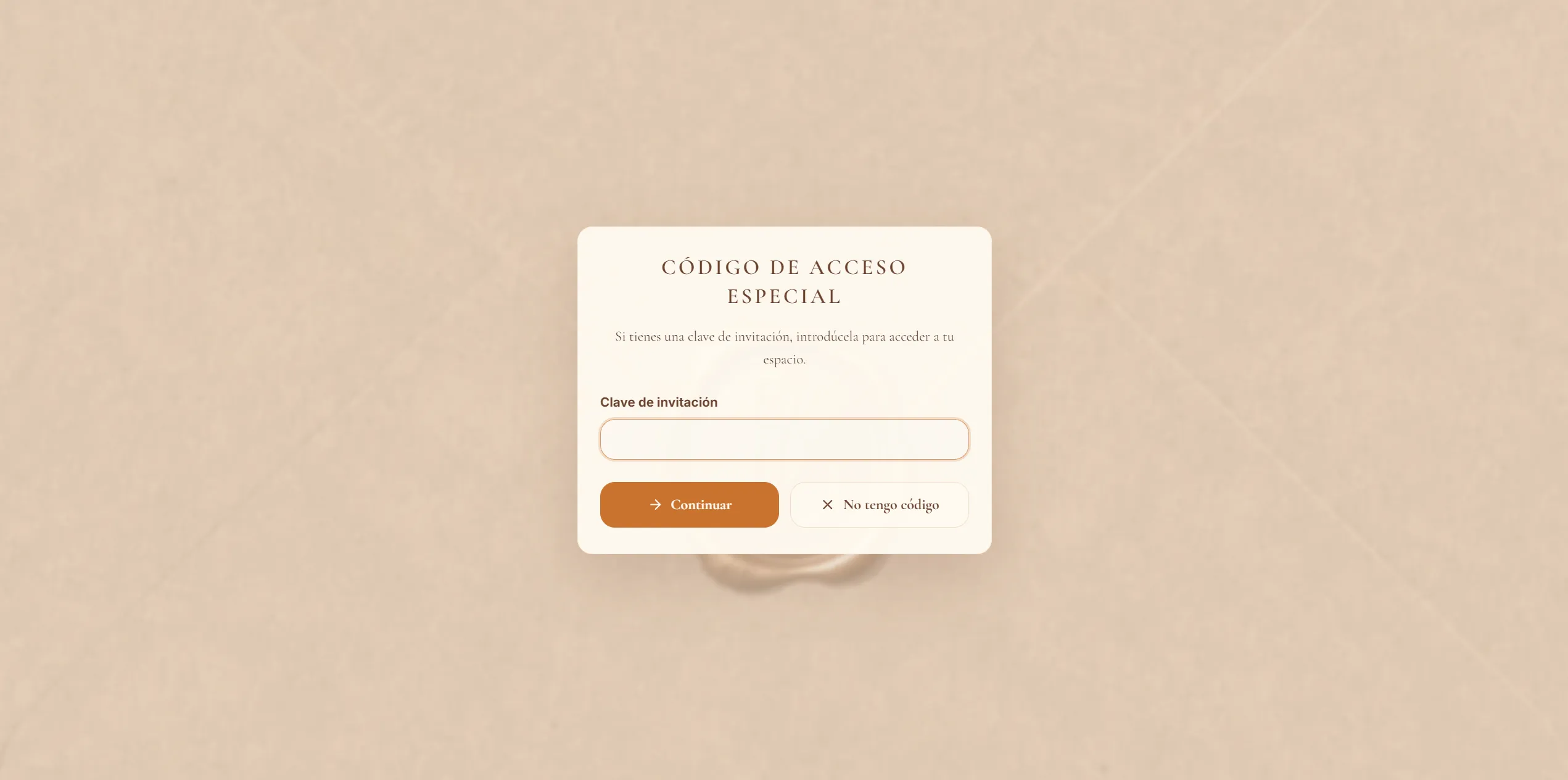
Once the code has been validated, the website displays the invitation’s personalised message and lets guests manage their RSVP. The session retains this context for future visits. General wedding information is available without a code.
RSVPs
The form lets couples and families RSVP together. It starts with the names listed in the invitation and allows guests to add or remove people and specify each person’s transport and dietary requirements.
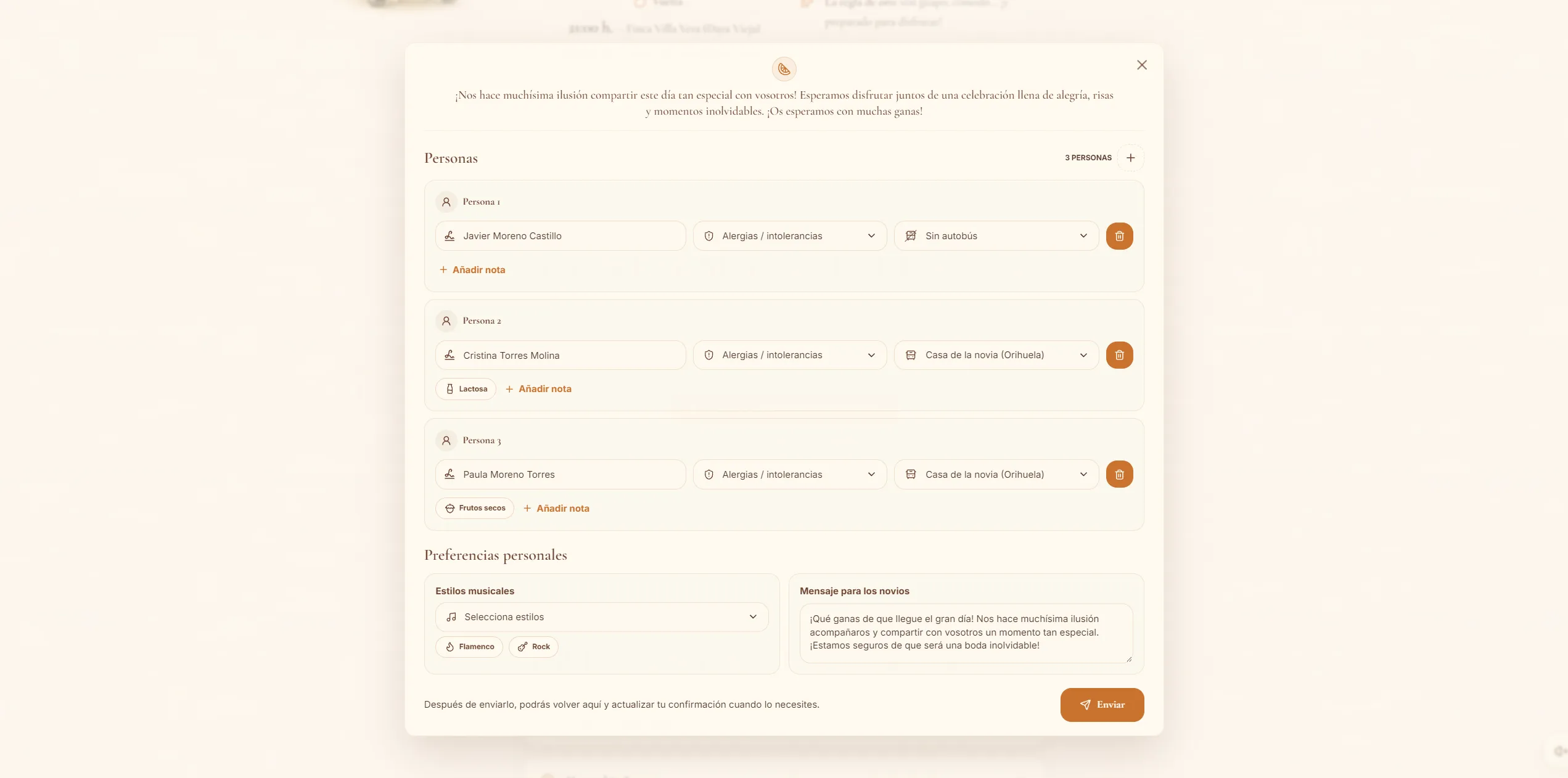
Guests can retrieve and update their RSVP while submissions remain open, keeping a single response per invitation. Changes are saved without reloading the page, and the form provides feedback on the submission status.
Admin dashboard
The private dashboard gives the couple an overview of their guests and their requirements. It is divided into invitation management and response review, distinguishing invited groups from confirmed attendees.
Invitation management
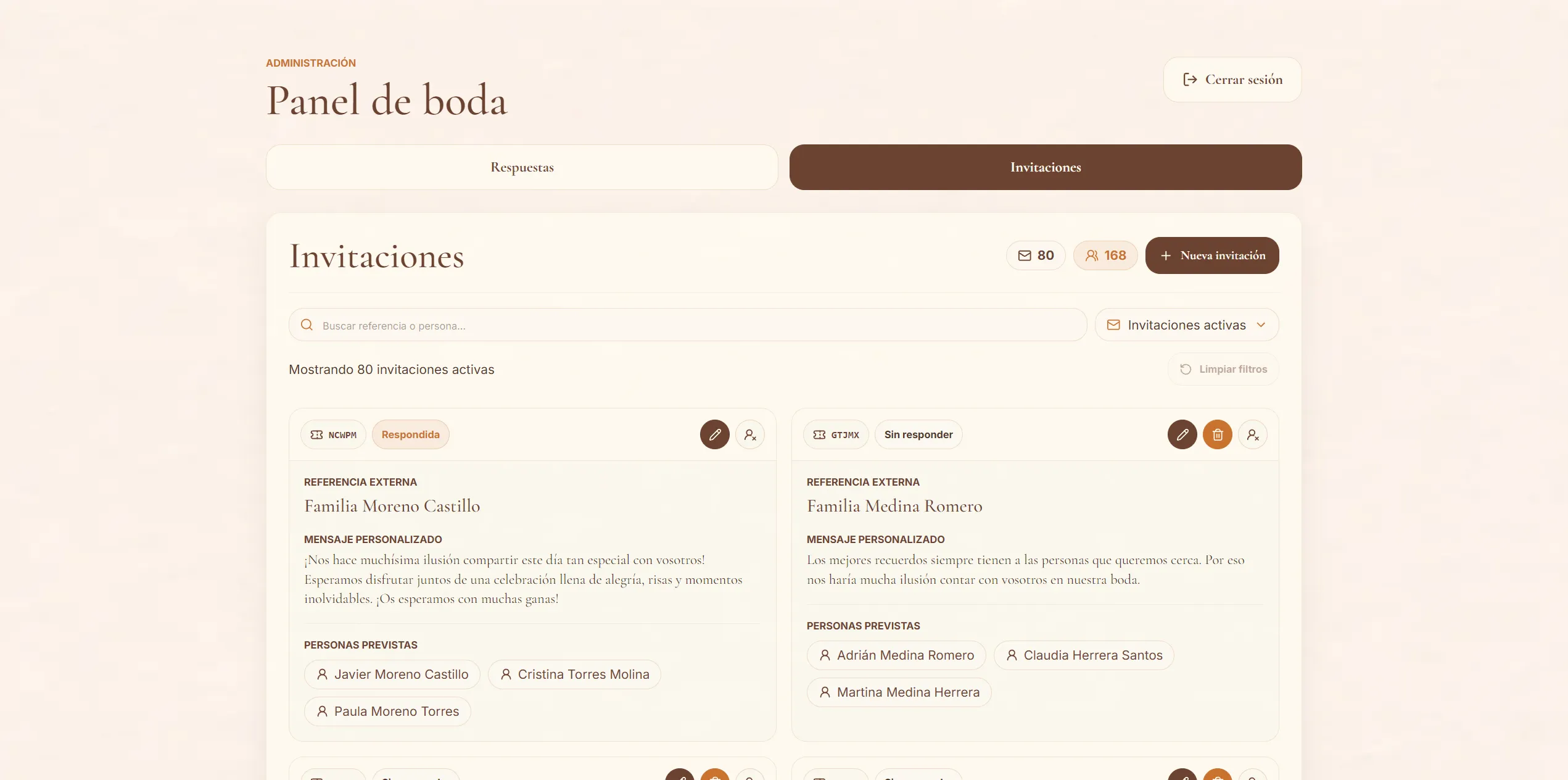
This view lets the couple set up invited groups, personalise their messages and obtain the link associated with each access code. The list shows response status, with search and filters to find unanswered invitations. Counters provide an overview of active invitations and expected guests.
Groups can also be marked as not attending and reactivated if their plans change, preserving their data and adjusting the totals.
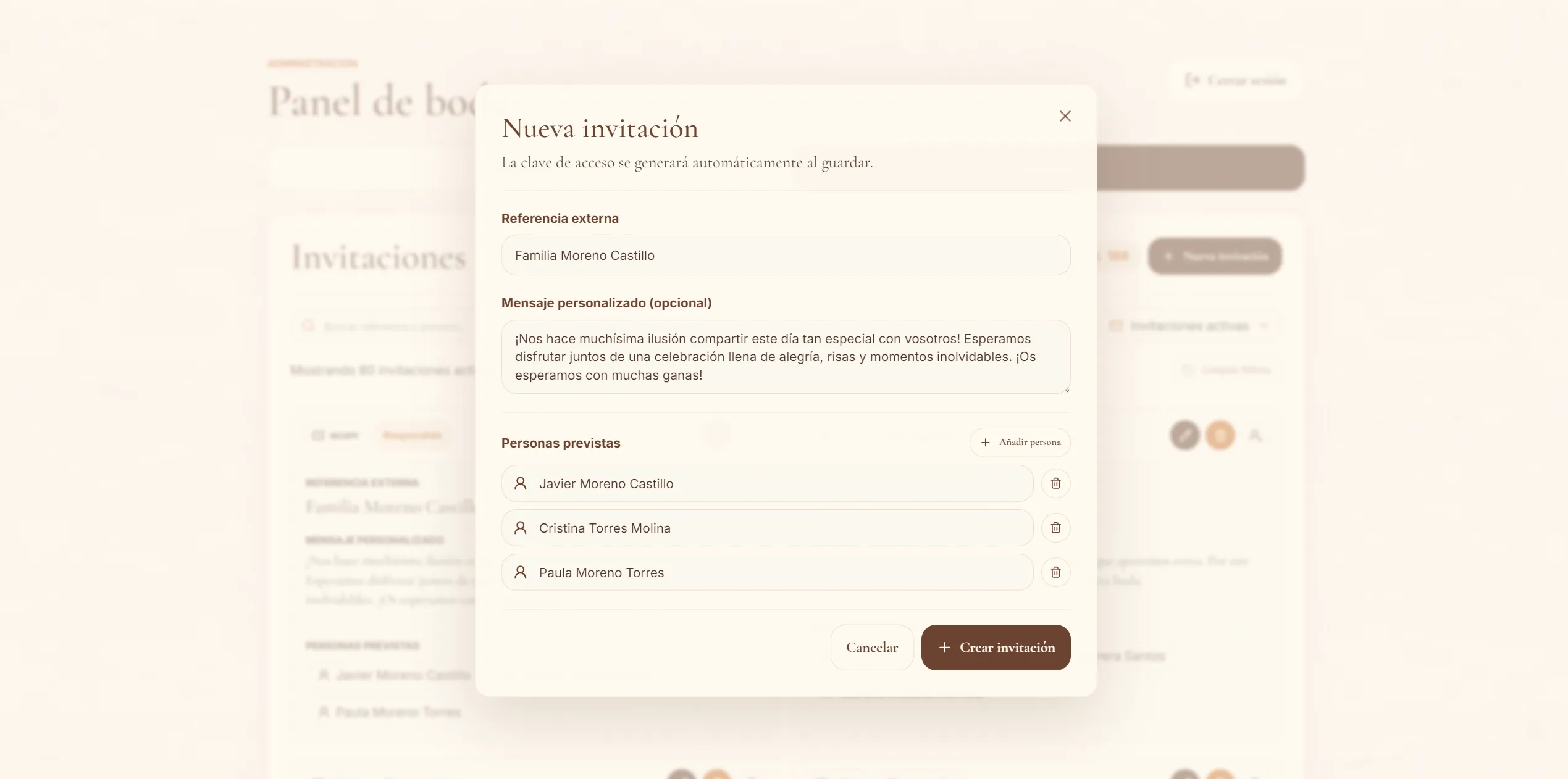
Invitations are created and edited in a dialog that brings together the group’s details. This keeps the list in context while preparing an invitation or adjusting its members.
Response review
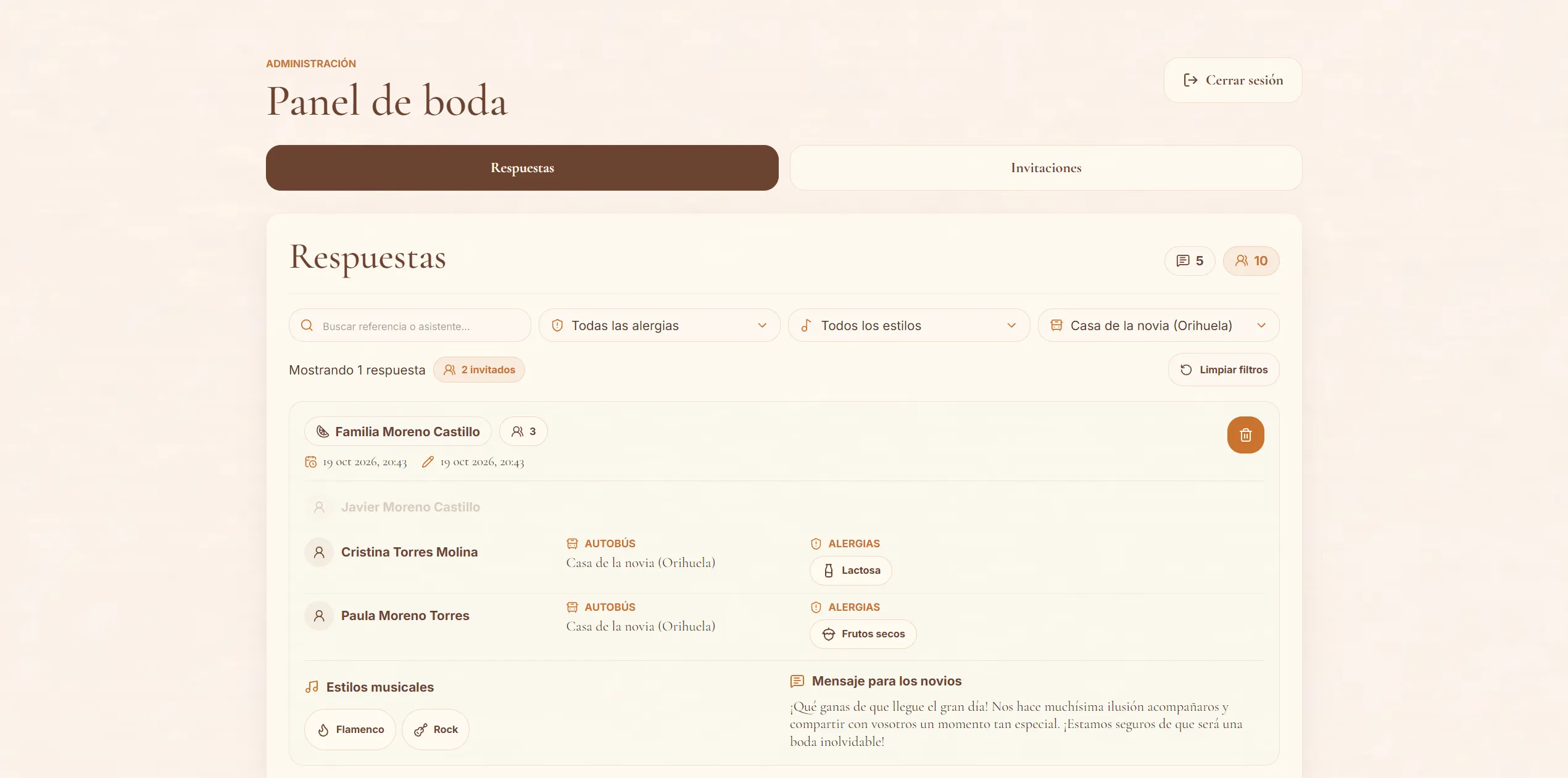
This view groups RSVPs by invitation and shows each attendee’s details. Search, filters and counters help the couple review transport and dietary requirements when arranging the bus or catering.
The interface highlights people who match the filters and dims the rest, keeping their group context visible. This lets the couple move from an overall attendance overview to the information needed for a specific task.
Architecture suited to the project
Astro and React share a Node.js application written in TypeScript. Astro renders content on the server, while React adds interactivity to the forms and dashboard. This approach limits hydration to components that need to manage state, without turning the entire website into a client-side application.
Application services separate business logic from the interface. Guest and admin sessions are independent, and permissions and RSVP rules are checked on the server.
SQLite suits the project’s scope by providing relational persistence without an additional database server to maintain. Transactions keep group RSVPs consistent, while the application remains straightforward to operate.
Visual identity and performance
The animated invitation gives the experience a personal touch: an envelope opens to reveal a letter with the couple’s message, personalised for each group when one has been provided.
The palette combines cream backgrounds, browns and orange accents to carry the invitation’s aesthetic throughout the website. The form and dashboard use the same visual language, adapted to interfaces where readability and information organisation take priority.
Colours, typography, spacing and visual treatments are defined in a shared theme using Tailwind CSS and reusable components. This keeps the website’s sections and forms consistent and makes the design easier to adapt to different screens.
Images play a prominent role in the experience. A shared component uses Astro and Sharp to generate variants in different sizes and in AVIF and WebP formats. With srcset and sizes, the browser selects the appropriate variant for the available space and screen density, avoiding downloading the original image every time.
The deployment infrastructure includes an Nginx image cache that reuses generated variants across visits, preventing Astro and Sharp from repeating the same transformation for every request. HTTP caching also lets the browser reuse previously downloaded images while they remain fresh.
Technologies and libraries
| Technology | Role in the project |
|---|---|
| Astro | Pages, server-side rendering and application actions. |
| React | Interactive RSVP form and admin dashboard. |
| TypeScript | Types for components, services and application data. |
| Node.js and SQLite | Server runtime and persistence for invitations and responses. |
| Tailwind CSS | Responsive design and styles based on a shared theme. |
Sharp and astro:assets |
Image generation and delivery in different sizes and formats. |
| Embla Carousel | Carousels for photographs and other website content. |
| Lucide | Shared iconography across Astro and React components. |
| Zod | Input validation in server actions. |
| Docker and Compose | Application packaging and execution with persistent storage. |
| Nginx | Reverse proxy and image caching in the deployment infrastructure. |